Built for Polar H10 users who want their data on iPhone and iPad
Record ECG, heart rate, RR intervals, and HRV from the Polar H10. View live charts in real time and export sessions as CSV, EDF, PDF, and legacy text files.
Capture complete sessions
Record ECG, HR, RR, and HRV data from the Polar H10 with timestamps and elapsed time.
Watch it live
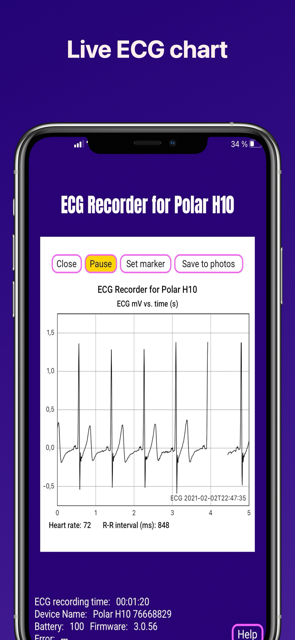
Follow live ECG, HR, RR, and HRV charts directly on iPhone and iPad while recording.
Export in useful formats
Open recordings in Numbers, Excel, EDFbrowser, or export a PDF snapshot of the last 30 seconds of the live ECG view.
Screenshots
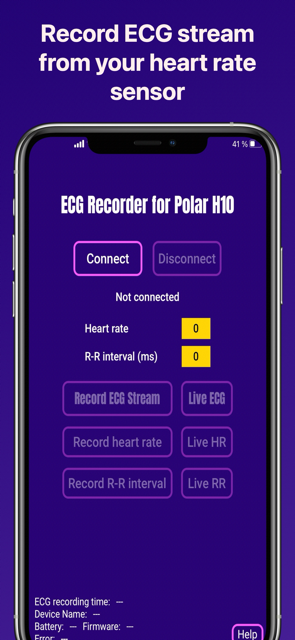
Two key moments of the app: the main recording screen and the live ECG chart.
Why people use this app
- Record ECG from the Polar H10 without needing a Mac or PC.
- Export data in formats that work well for analysis, sharing, or archiving.
- Review live trends for ECG, HR, RR, and HRV during a session.
- Save screenshots to Photos and create a PDF of the ECG chart when needed.
How it works
Connect the Polar H10 over Bluetooth, start a recording, and view the incoming data live on iPhone or iPad. The app records ECG, heart rate (HR), and R-R interval (RR) data and can calculate HRV from accepted RR intervals. Minimum H10 firmware for ECG is 3.0.35.
If the user has an active subscription “Enable premium features” (IN-APP purchase), recordings are saved to the ECG Recorder App’s directory in the “Files” app, with the file name based on the recording start time. ECG is exported as .csv, .edf, and a legacy ascii text file. HR and RR are exported as .csv plus legacy ascii text files. HRV is exported as .csv. The CSV files include local timestamps and elapsed seconds, so in most cases there is no need to create a separate time column manually. Premium features also include live charts of ECG, HR, RR, and HRV, plus PDF export of the live ECG view.
Export and analysis
ECG: sampled at about 130 Hz in microvolts (uV), exported as.csv,.edf, and legacy ascii text.HR: about one value per second, exported as.csvand legacy ascii text.RR: beat-to-beat timing in milliseconds, exported as.csvand legacy ascii text.HRV: calculated from accepted RR intervals and exported as.csvwith RMSSD and SDNN.
The ECG CSV export contains timestamps and elapsed seconds. ECG recordings can also be opened as .edf files in EDFbrowser. In addition, the live ECG chart can be exported as a PDF snapshot on an A4 ECG-style grid (25 mm/s, 10 mm/mV), showing the last 30 seconds of ECG rather than a long full-session export. Some sample ECG data and demo videos are available for import into Apple Numbers and EDFbrowser.
App support and contact
Please email ecg-recorder [ a t ] cmdline [ d o t ] net with all questions and comments. Or open an issue on GitHub.
Note on Apple Health Support
Apple does not allow third-party apps to write ECG waveforms to Apple Health, except for ECGs recorded by Apple Watch. This app can, however, export three other data types to Apple Health when enabled in Settings: heart rate, beat-to-beat timing, and HRV (SDNN).
Demo videos
Have a look at the demo videos and sample data for opening recordings in Apple Numbers or EDFbrowser.
ECG DATA
According to specifications ECG data is collected at a rate of 130 Hz (my device works at 130.061 Hz) in microvolts (µV). That means that there is one value every 7.692 milliseconds (ms). For a 10 minute recording that is about 78000 values. When importing the data into e.g. Microsoft Excel or Apple Numbers, you can divide all ECG values by 1000 to receive millivolts (mV). The ECG CSV export already contains timestamp and elapsed_seconds columns. The “Set marker” button in the ECG live chart adds a value of 2000 µV to the data. This value can be easily seen in a graph or found by searching through the data.
ECG recordings are also exported directly as .edf files, which can be opened in the open source software EDFbrowser. In addition, the live ECG chart can be exported as a PDF on an A4 ECG-style grid (25 mm/s, 10 mm/mV), which is convenient for viewing, sharing, or printing the last 30 seconds of ECG. Some sample ECG data and demo videos for import into Apple Numbers and EDFbrowser are available.
HR DATA
There is about one HR value (average beats per minute, bpm) recorded per second. HR CSV exports include local timestamps and elapsed seconds.
RR DATA
The RR interval is the time elapsed between two successive R-waves of the QRS signal on the electrocardiogram (the reciprocal is the HR). RR intervals are recorded in ms. RR CSV exports include local timestamps and elapsed seconds.
HRV DATA
HRV is calculated from accepted RR intervals and exported as RMSSD and SDNN in milliseconds. To reduce obvious artifacts, RR intervals outside 300-2000 ms are ignored, intervals that differ by more than 200 ms from the previous accepted interval are rejected, and once a short baseline is available, intervals must stay within 20% of the recent median. HRV CSV exports include local timestamps, elapsed seconds, window length, RR count, RMSSD, and SDNN.
TERMS OF SERVICE
Please note: This app is for informational purpose only. Use of the app and site is not intended to be a substitute for professional medical advice and you should promptly contact your own health care and/or provider regarding any medical conditions or medical questions that you have. THE APP AND WEB SITE DO NOT OFFER MEDICAL ADVICE, AND NOTHING CONTAINED IN THE CONTENT IS INTENDED TO CONSTITUTE PROFESSIONAL ADVICE FOR MEDICAL DIAGNOSIS OR TREATMENT.
Why did I make this app?
I am a passionate runner and was looking for a heart rate monitor for sports application. I came across the Polar H10 and was intrigued by the possibility to obtain real ECG data from this device. To my surprise in late 2019 there was no iOS app on the App Store which offered recording or displaying of the data. There was one exception, but it was quite costly and not clear what was offered. Since I saw no other options and Polar provides a very good SDK vor the H10, I decided to develop my own app.
Why an app with subscriptions?
It turned out very soon that development of this app will consume a significant amount of time and in the end also costed money. I hope that the small fee asked will compensate a little bit for the invested time and money.
The app is free to download to get a first impression and connect to a device. It is possible to see a few seconds of the live charts. To activate the premium features, please make one of the available IN-APP purchases. Each subscription has a one week free trial, so all features can be tried free of charge. I found that a model of subscriptions of various durations with a one week free trial will be the most fair. It is also possible to do a one time payment without any recurring subscriptions.
This App uses the excellent Purchase and PolarBle SDKs.
Note: The German versions of the Impressum and the Privacy Policy are the legally binding versions.